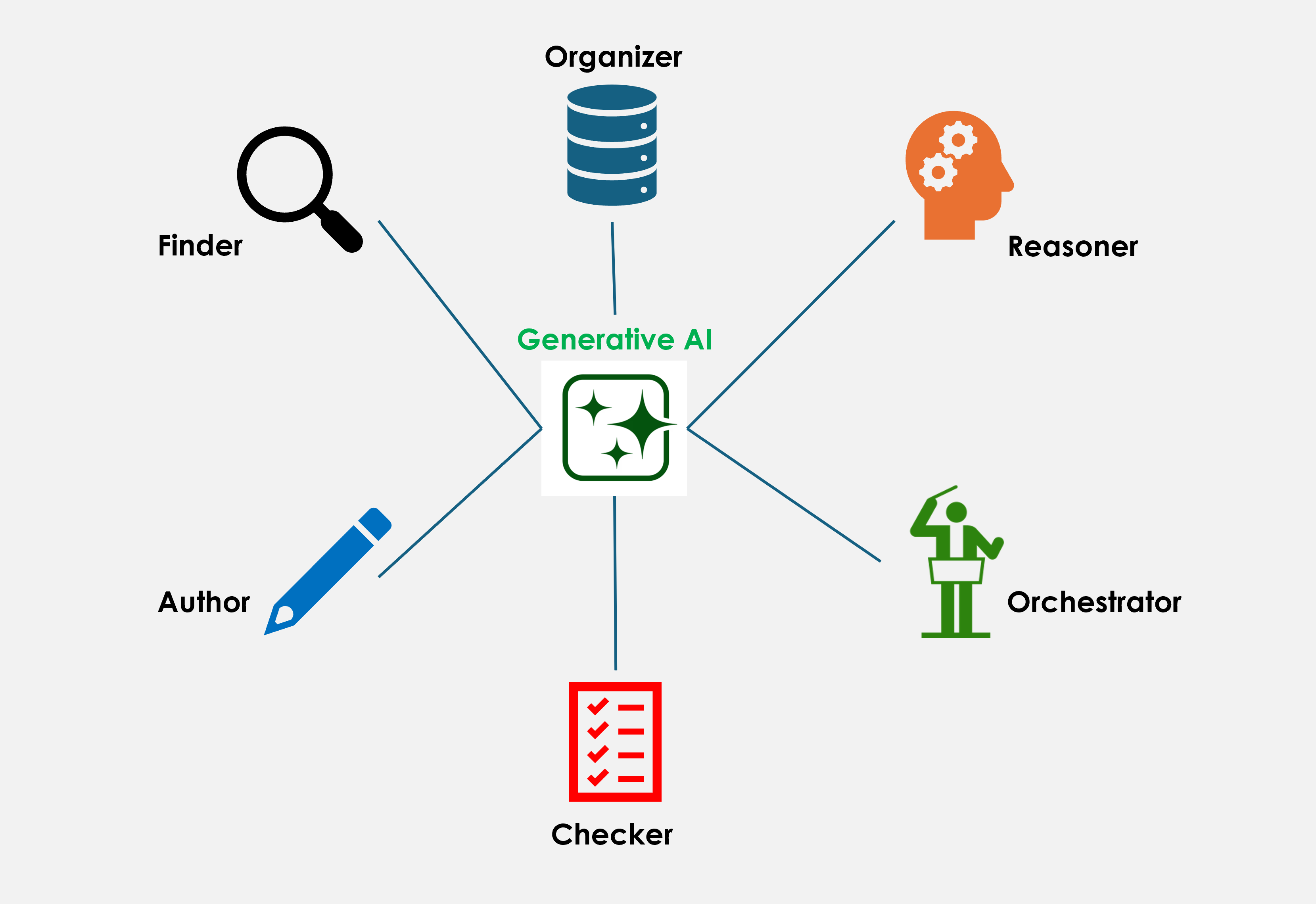
Most people's entire experience of GenAI is a chat window. You type something in it and it types something back. That's a fine starting point, but it's a small slice of what's actually available to you right now, often inside the exact same subscription you're already paying for. This article breaks down those six jobs, how to reach them, and where they fit across a real R&D project.
Chat is the front door, not the whole house
Chat already does more than most people realize. Ask a modern assistant a question, and behind the scenes it can decide to search a website to access up to date information, look something up in a document, or work through a calculation before answering. A single chat conversation is often quietly blending several capabilities together without you ever noticing the handoff.
A simple example: open NotebookLM (or a similar tool), upload a few documents, and ask it to turn them into a podcast-style audio summary. Type the request, and out comes a fully produced two-person conversation, both script and audio from the documents you provided minutes ago. That's not just “predict the next word” capability that LLM's are known for. That is a combination of many steps working together: understanding the source material, structuring it, writing dialogue, and generating audio, all triggered from one line typed into the chat box.
The chat today is less a single tool and more a doorway into a set of different capabilities, and the same window is tapping into multiple capabilities depending on your ask. Here are six fundamental capabilities that GenAI has.
The six things generative AI can do
1. Finder — the colleague who remembers everything
Ever searched your company's files for something you know exists, but couldn't find it because whoever wrote it up used different words than you are searching for? Finder solves that. It searches by meaning, not exact wording, so asking “have we had this XXX problem before?” surfaces the right report even if it was filed under a completely different name.
2. Organizer — the tidy-up crew
Every company has the same mess: the same material called five different things by five different people or systems. Organizer can clean this up, matching everything to a common reference so that your data is actually usable together. This works both for improving your structured data, and structuring your documents. This is a core capability that is needed to make data Findable, Accessible, Interoperable and Reusable (FAIR).
3. Reasoner — the sharp colleague who pressure-tests your ideas
Thinking about trying something new? Try the reasoner capability. Reasoner does a quick sanity check against the things that matter: cost, safety limits, rules. It is capable of not just telling whether something confirms or not but the reason why as well.
4. Author — your own personal assistant
Drafts your communication, report, summary, or SOP using your actual project data, so you are not starting from a blank page or hunting for the right template. You can still be the human in the loop to review and finalize it, but it helps overcome the writer's block that you face when you are trying to write something new.
5. Checker — the second pair of eyes
Before something goes to a reviewer or regulator, Checker scans for what's missing or inconsistent, the stuff that's easy to miss when you are proof-reading your own document. It doesn't replace a human sign-off but it just makes sure the reviewer isn't catching basic gaps that a tool should catch first.
6. Orchestrator — the one who brings it all together
This is the role people forget about, and it's arguably the most valuable. Finder found the information, Reasoner weighed it, Author wrote it up, Checker confirmed it was solid. The Orchestrator connects the dots: chaining together the different capabilities in sequences and loops to produce the result. Think of it less as “a step” and more as the glue between steps.
Where to find each role in Microsoft 365 and what gets in the way
Microsoft 365 is the enterprise standard for most companies, so here's the honest map: what each role looks like inside Copilot today, and why teams often come away underwhelmed.
| Role | Where it lives in Microsoft 365 / Copilot | What usually causes disappointment |
|---|---|---|
| Finder | Copilot semantic search over SharePoint or OneDrive is generic to fit broad document types and is limited in number of results. | Searching a messy, duplicated, inconsistently named SharePoint library is difficult. Copilot may not retrieve the best documents leading to poor results. |
| Organizer | Copilot can structure your data provided you give it a clear instruction. | But to do this properly at scale, you need more robust instructions and an automation pipeline. This is what you need if you are trying to fix a dataset. |
| Reasoner | Copilot chat given the actual constraints (specs, cost limits, supplier data) to weigh, rather than a general question | This usually works better when you supply your own document with constraints, and prevent copilot from using generic content from SharePoint or OneDrive. |
| Author | Copilot in Word, Outlook, and PowerPoint, drafting from your own attached content | Left on default settings, so drafts come out generic instead of your team's actual report format — fixable with saved instructions or a template, rarely done |
| Checker | Copilot chat given an attached document and your team's actual completeness rules or checklist to check it against, rather than a general "review this." | This usually works better when you supply your own checklist, and prevent Copilot from checking against generic or assumed criteria. Doing this at scale across many documents needs an automation pipeline, not chat. |
| Orchestrator | Not available in Microsoft 365 Copilot. This means an agent deciding on its own to update a record, notify someone, or trigger a process once a condition is met. Chat can describe what should happen next, but it can't do it. | Chat window does not have access and permissions to play this role. So manual orchestration is needed. Needs a different kind of tool. |
Finder and Author are what Copilot does natively. Organizer, Reasoner, Checker are what Copilot can be steered to do with more specific instructions. Although if you want to run Organizer, Reasoner or Checker, systematically through a whole dataset, you would probably not use chat but an automation pipeline. Orchestrator is a different mode of the product entirely. Actually Microsoft sells another product called Copilot Studio to tech-savvy users to do this.
How a coding agent works
A coding agent does these six jobs when creating code. Finder searches the codebase by meaning, so “where do we already do this?” finds the right function even under a different name. Organizer keeps the change in the names and structure the repository already uses. Reasoner checks the approach against what must not break, and when a run fails it says why. Author writes new code or makes alternate suggestions to code that is already there. Checker looks for what is missing or inconsistent before you accept it. Orchestrator runs it — the test, the build, the page, and if the result comes back wrong, the loop goes through Reasoner and Author again until the change actually lands.
Generative AI opportunities across the innovation funnel
A typical R&D project moves through six phases: ideation, feasibility and concept screening, bench-scale development, scale-up and pilot, validation and regulatory, and launch and commercialization. GenAI can help in all six. The kind of help changes along the way: finding and pattern-matching early on, drafting and consistency in the middle, completeness checking at the regulatory stage, and coordination at launch. Four of the biggest pain points show what this looks like in practice.
1. Turning market signals into product opportunities (Finder and Author)
Pain point: Sheer volume of scientific content, market trends, consumer feedback and competitor move documents makes actionable synthesis difficult.
How GenAI helps: Finder gathers these signals and Author synthesizes them into themes and avenues for new products, so teams start from the whole picture.
2. Checking against regulatory requirements (Reasoner, Checker and Orchestrator)
Pain point: Fixes are costly because gaps against regulatory requirements are found late.
How GenAI helps: Checker compares a draft against the requirements and lists what is missing. Reasoner explains why each item matters, so the human reviewer can focus on judgment calls. Orchestrator can do this agentically.
3. Reports and administrative documents (Finder and Author)
Pain point: Scientists lose time because logs of what was done, stage-gate documents and other reports have to be written in every phase.
How GenAI helps: Finder pulls the relevant data and Author drafts the document in your team's format, for the scientist to review and finalize.
4. Extracting data from diverse sources (Organizer)
Pain point: Data is hard to use together because it sits in lab experiments, instrument exports, reports and spreadsheets in different formats.
How GenAI helps: Organizer extracts the data and structures it into a common format, so it can be searched and compared.
How much of this is within reach for your team depends on three things: the GenAI tool you use, its capabilities, whether it is connected to your own data, and how clean and well organized that data is.
Conclusion: GenAI is a powerful and versatile technology, and it can do far more for R&D than chat alone.
Frequently asked questions
Do I need a special tool to get started with generative AI in R&D?
No. Chat with your own documents attached is enough to draft, reason through a problem, or check one document against a checklist. Finder, which searches across your company's files, needs a generative AI tool connected to them. Orchestrator, which coordinates live systems such as LIMS, ERP, or PLM, needs a connection to those systems.
Why are results from Copilot or another enterprise generative AI tool disappointing in R&D?
The most common cause is the data, not the tool. Search returns weak results when the library is messy, duplicated, or inconsistently named. Drafts come out generic when the tool runs on default settings, and checks come out generic when nobody supplies a real checklist.
Is it safe to paste company information into a generative AI tool?
That depends on the tool and on your company's policy. Treat anything pasted into a personal account as external, and check what your organization allows before sharing confidential data.
Does generative AI replace the scientist or the reviewer?
No. The Author role produces drafts for a person to review and finalize, and the Checker role catches basic gaps before a human reviewer sees the document. Sign-off stays with people.
Where should an R&D team start with generative AI?
Pick one pain point where information is scattered or documents take a long time to write: turning market signals into product ideas, checking drafts against regulatory requirements, writing reports and stage-gate documents, or extracting data from lab files in different formats. Test it on a past project where you already know the answer, so you can judge the result.
Can generative AI propose new molecules or formulations?
Specialized models trained on chemical structures can, but that is a different technology from chat-based generative AI tools. It is usually run by a computational chemistry or materials informatics team, not typed into a chat window.